Hi all
I have recently purchased and installed a Konnected Alarm Panel Pro. Installation and wiring process was smooth enough (except for some fiddling required to make siren work, UK based replacing an Eaton system)
I am able to access the Panel via the Konnected app and everything seems to be working when I look at the web console, motion sensors report states correctly and I can test the siren, piezo buzzer etc.
However I have not been able to add the Panel to SmartThings as when I link to the Konnected partner service it says no devices have been added.
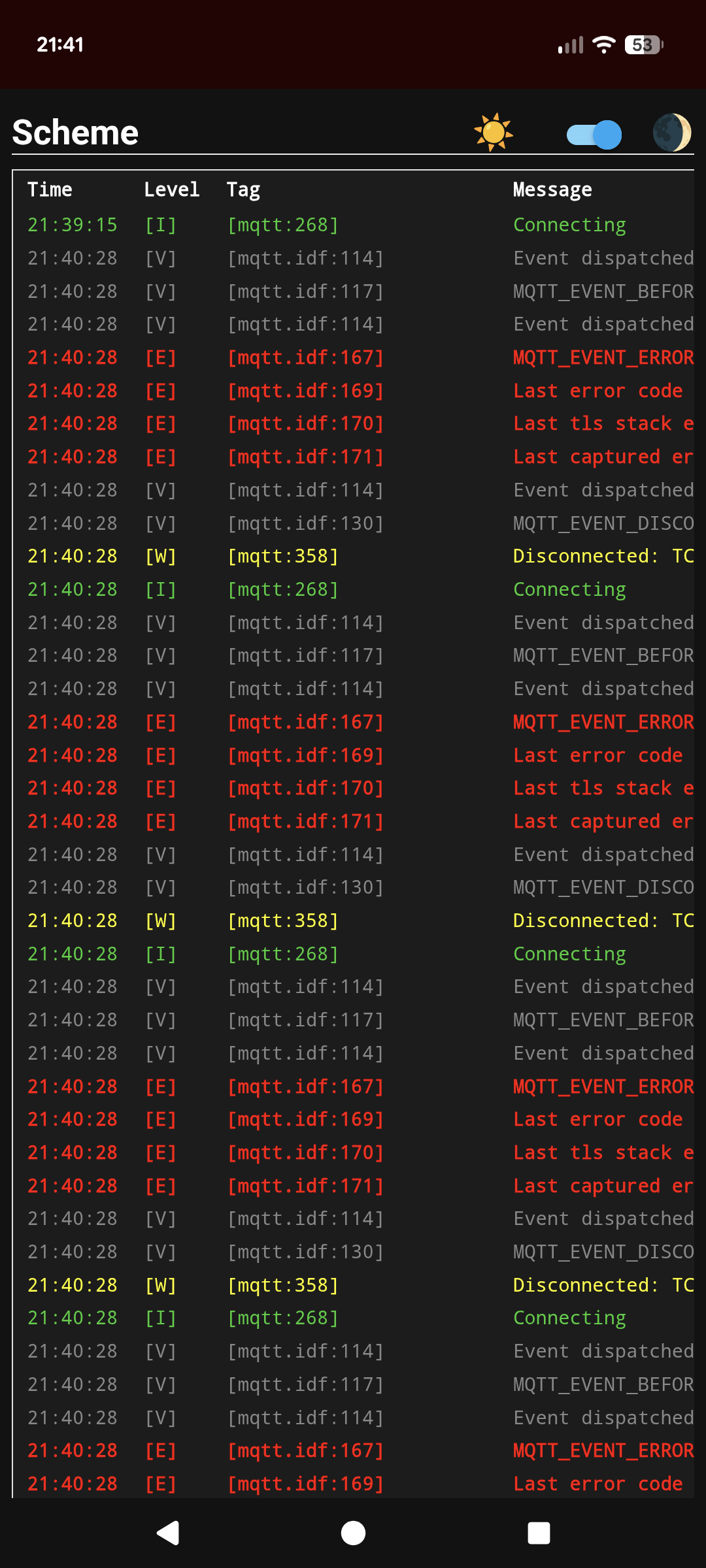
I have also noticed that the log reports a looping MQTT error (screenshot below) and eventually this causes the device to reboot.
I have tried multiple different firmware combinations:
Connecting by WiFi to my mesh network (Unifi Amplifi system)
Connecting by WiFi directly to my ISP’s router (normally I don’t use this but I turned on to test as I read a comment from another user about their mesh network causing issues)
Connecting by Ethernet
Konnected Cloud & Local Native API both Enabled
Konnected Cloud enabled & Local API disabled
I also tried flashing firmware by USB to restart process
All of the above combinations end up resulting in the log showing the same MQTT error loop and not able to see the device in SmartThings. I did a firmware version with Local API Enabled only and the error behaviour didn’t recur on the log. But I don’t have Home Assistant or anything (yet) to use this.
Any assistance would be greatly appreciated.