Hi Nate,
I wanted to start a new topic for this because the original thread may have looked resolved, but my actual issue is still not fixed.
I have a GDO blaQ paired with SmartThings and a LiftMaster/Chamberlain 889LM wall control. The motion sensor itself is working on the wall panel. When I walk into the garage, the light turns on automatically, so I know the motion function is active and the physical SENSOR switch on the 889LM is ON.
The problem is that SmartThings still does not update or display the motion status correctly.
What I have confirmed so far:
-
The 889LM is installed and motion works locally
-
The GDO blaQ is otherwise working properly
-
SmartThings can see the door and other statuses
-
The motion section in SmartThings is still blank or does not update
-
This has continued even after firmware update and reinstall
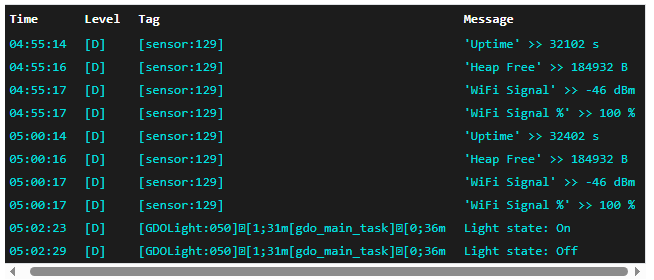
In my earlier testing, the logs appeared to show the light state changing:
So the opener and wall control seem to be reacting properly, but SmartThings is still not getting usable motion status.
Could you take another look at this? It seems like the motion capability is functioning on the hardware side, but not being reported correctly into SmartThings.
If needed, I can provide:
-
my device ID
-
current firmware version
-
screenshots
-
log output
The old post is here but I haven’t been getting any response there: SmartThings status not updated on GDO blaQ - #13 by sonnaps
Not sure if this is the answer you are looking for. The 889LM motion sensor does not communicate through the GDO to Smartthings.
You should check the Konnected Knowledge Base, there are answers there.
Extra Wired Sensor on the GDO blaQ
How to add an extra auxiliary wired contact or motion sensor to the GDO blaQ
Use extra inputs ① or ② to connect an external wired open/close or binary sensor to the GDO blaQ. The extra sensor will appear as a separate device or entity in the smart home app, and isn’t used to determine the state of the garage door. Some use cases are:
Add a wired contact sensor to confirm that the garage door is closed.
Add a motion sensor to the garage.
Add a push button to the garage to trigger some automation.
Add a wired contact sensor for a door or cabinet.
Wiring an Extra Sensor
Contact Sensor
Connect one side of the contact sensor loop to ① or ②.
Connect the other side to either of the  white terminals.
Powered Sensor
A 12V power sensor, like a PIR motion sensor or glass-break sensor, can be powered from the AUX +/- terminals. Connect the red (+) wire to AUX+ and black (- or 0v) to AUX-.
Connect the signal wire pair as above in Contact Sensor.
Enabling the Extra Sensor
Using the Konnected App
Screenshot_20250926_210619_KonnectedFrom My Devices, tap on your GDO blaQ and tap Settings > Extra Input / Output
Tap on Extra #1 or Extra #2 and select Open/Close Sensor
Set the Name and Sensor Type. This determines how the extra sensor will appear in your smart home app.
Check the Inverted option to invert the open/closed logic if needed.
Self-managed ESPHome firmware
Add the gdo/external-binary-sensor.yaml package to the list of packages in your GDO blaQ ESPHome config:
packages:
remote_package:
url: GitHub - konnected-io/konnected-esphome: ESPHome firmware configuration and recipes for Konnected devices · GitHub
files:
- path: packages/gdo/external-binary-sensor.yaml
vars:
idx: 1
pin: $input1
name: Garage Motion
device_class: motion
As you know, Liftmaster/Chamberlain does not communicate with Smartthings.
I am not aware, but in any case doesn’t the Liftmaster/Chamberlain communicate with the GDO blaQ, and the blaQ then communicates with SmartThings? I feel like it is more a firmware or driver issue but can’t seem to get the attention of Nate on this.