Install two of these right before Xmas. Updated FW the day after I installed them and verified they were online and controlling the doors.
The android app always (99% of the time I look in the pas 2 days) has a yellow symbol next to them (app is useless anyway)
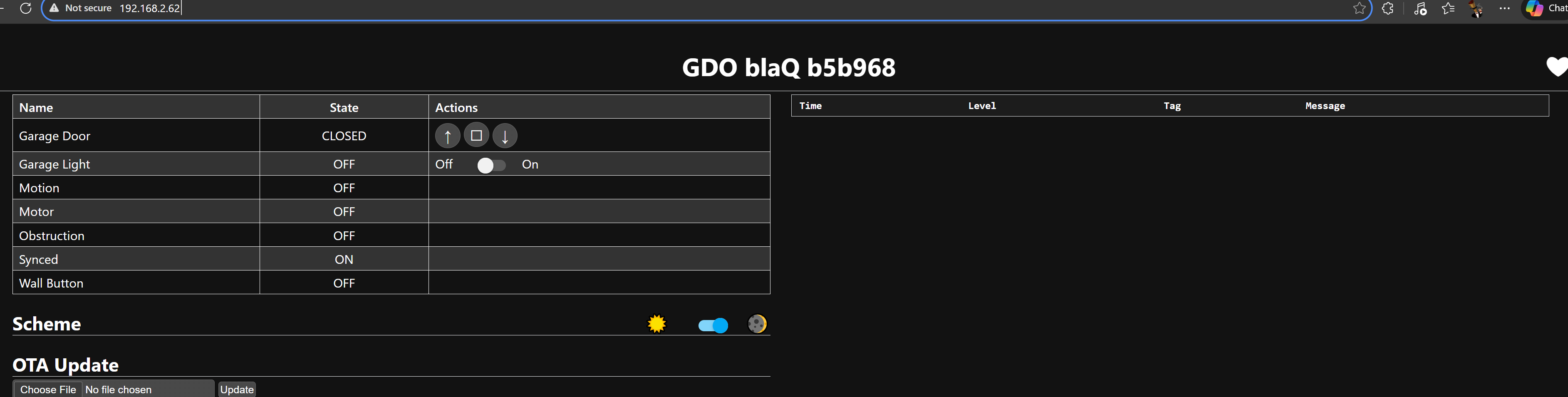
when I try to load the native web pages, IF they load they take a min of 30 seconds, most of the time they do not load at all. Look at that ping time! Yahoo.com ping time averages 32ms yet the Konnected on my own router is 20 to 40 times longer?
This site can’t be reached
192.168.2.63 took too long to respond.
Pinging 192.168.2.63 with 32 bytes of data:
Reply from 192.168.2.63: bytes=32 time=629ms TTL=64
Reply from 192.168.2.63: bytes=32 time=1239ms TTL=64
Reply from 192.168.2.63: bytes=32 time=1801ms TTL=64
Request timed out.
Ping statistics for 192.168.2.63:
Packets: Sent = 4, Received = 3, Lost = 1 (25% loss),
Approximate round trip times in milli-seconds:
Minimum = 629ms, Maximum = 1801ms, Average = 1223ms
Pinging 192.168.2.62 with 32 bytes of data:
Reply from 192.168.2.11: Destination host unreachable.
Reply from 192.168.2.11: Destination host unreachable.
Reply from 192.168.2.11: Destination host unreachable.
Reply from 192.168.2.11: Destination host unreachable.
Ping statistics for 192.168.2.62:
Packets: Sent = 4, Received = 4, Lost = 0 (0% loss),
When they are online I get logs like this that they are dropping offline…
07:22:05 [D] [sensor:135]
‘Heap Free’: Sending state 215664.00000 B with 0 decimals of accuracy
07:22:05 [W] [api.connection:213]
Home Assistant 2025.12.5 (192.168.2.61) is unresponsive; disconnecting
07:22:05 [W] [component:333]
api set Warning flag: unspecified
07:22:05 [D] [sensor:135]
‘WiFi Signal’: Sending state -54.00000 dBm with 0 decimals of accuracy
07:22:05 [D] [sensor:135]
‘WiFi Signal %’: Sending state 92.00000 % with 0 decimals of accuracy
I’ve also noticed this as well with my device. It was working fine when installed / for a while, then all of a sudden (maybe last week?) I’ve noticed the same unresponsiveness.
I have a WiFi AP right next to the device (with the signal % saying 100%), so I don’t think it’s internet issues. However, I get the same slowness / unresponsiveness when pinging / accessing the UI - it’ll eventually work (sometimes). Rebooting did not solve it, nor did the logs when loaded show anything useful about unresponsiveness.
I’m on ESPhome 2025.7.5 + version 1.5.2, with the GDO blaQ. I was working on updating it to the latest version, however saw this thread, so figured I’d +1 it.
This is coming from the ESPHome APIConnection class here:
Looks to me like that block of code is executing when the ESPHome device doesn’t get a timely response from Home Assistant, then it runs some fatal error callback.
So that seems to indicate that ESPHome is aborting the connection intentionally bc HA can’t be reached. Then after a little while it repairs itself and re-connects. Not sure why.
The API connection handling and networking aspects on the Konnected devices are all handled by the underlying ESPHome framework, so I’m not directly familiar with that bit of code/logic.
It does not sound like a WiFi signal issue. Maybe a Home Assistant issue, or some other underlying network issue.
It may be helpful to see a longer log sequence from the device, which shows the initial connection, disconnect, and re-connect. It would also be interesting to see if your local client stays connected. You can stream the logs from a computer/laptop on the network, see here: Observability, logging and MQTT - #3 by nate
except that when I “disable” Home Assistant’s ESPHome integration I still have extreme slowness and frequent time-outs from the blaQs built-in web site.
Seem that either…
If the API is ever connected, then Disconnected (even purposefully), the blaQ cannot handle it and goes into ‘freak-out’ out forever (or until it powers off/on)
or
Its not related to the API connection
Right now my devices are not reachable at all… the web site times out. I then disabled the ESPHome Integration… still not reachable. I even rebooted my wifi router. Did not help.
I’m going now to unplug/replug the units and keep the ESPHome integration disabled, will report back in a few hours
Bingo. I think the underlying problem is network related. Something on the network is preventing the flow of local traffic freely and consistently. That’s why you’re seeing inconsistent ping results, web page loading, and API disconnects. All three of those services use different parts of the TCP stack and different underlying components.
All I know is I have no internal firewalls, filtering, vlans, QoS, or anything else… I only have problems connecting to the 2 blaQ devices when ALL other LAN and Internet web sites and apps work from any device (ethernet or Wifi) and load in under 1 second…
Multiple apps running in Synology containers - all have Web UIs on multiple ports
Multiple apps running on a Server PC (blue iris, Home Assistant in a VM, Zigbee2MQTT, Plex Server, etc)
Multiple physical devices running a web site on port 80… StormAudio processor, Theory Audio amps, HP ethernet switch, Global Cache iTach IP2SL, EnvisaLink EVL4, HDHomeRun FLEX DUO, two separate MyQ garage openers, Yamaha AVR, and more
frequently I see the page take 5 to 10 seconds to load to this state below, then another 5 to 0 to load the rest. And that is when it does not timeout. It is never fast, ever.
@nate I can screen share with you and show you. I get that you may have never seen this before but if its my network and it only affect your devices then I’m going ask you to show me exactly where/how its my networks fault since the outlier is your devices and I have 20 other web sites on devices / apps that do not have this problem.
@LTek You’ve previously told me that you’re using an Asus router. I searched our support history and found a customer who solved a similar connectivity issue by disabling the Smart Connect feature in the Asus router settings.
Alternatively, in the Asus router settings you can create a separate 2.4GHz network with a different SSID than the main multi-band network.
both blaQ, since day 1, have been on the 2.4GHz only SSID on my router. Its not possible for it to be moved to 5GHz on my router, that is a different SSID.
I know you are hoping its a network config issue… its not.
I’ve venture to say it may be literally impossible for all my other 20+ web UIs (half of which work on port 80, like the blaQ does) internally to have ms (instant) response times yet your two devices have massive problems and it be ‘my networks fault’
Not what I’m saying AND I think I figured out the issue, and hope you will look at this deeply in the code (make it more resilient to poor connections) and improve the blaQ wifi antenna which looks to be very weak from the testing I state below…
Now… blaQ web pages fully load in ~2 to 3 seconds
Before… ~ 30 seconds, or timed out.
What did I do to fix… nothing, I swiveled the router antennas a little.
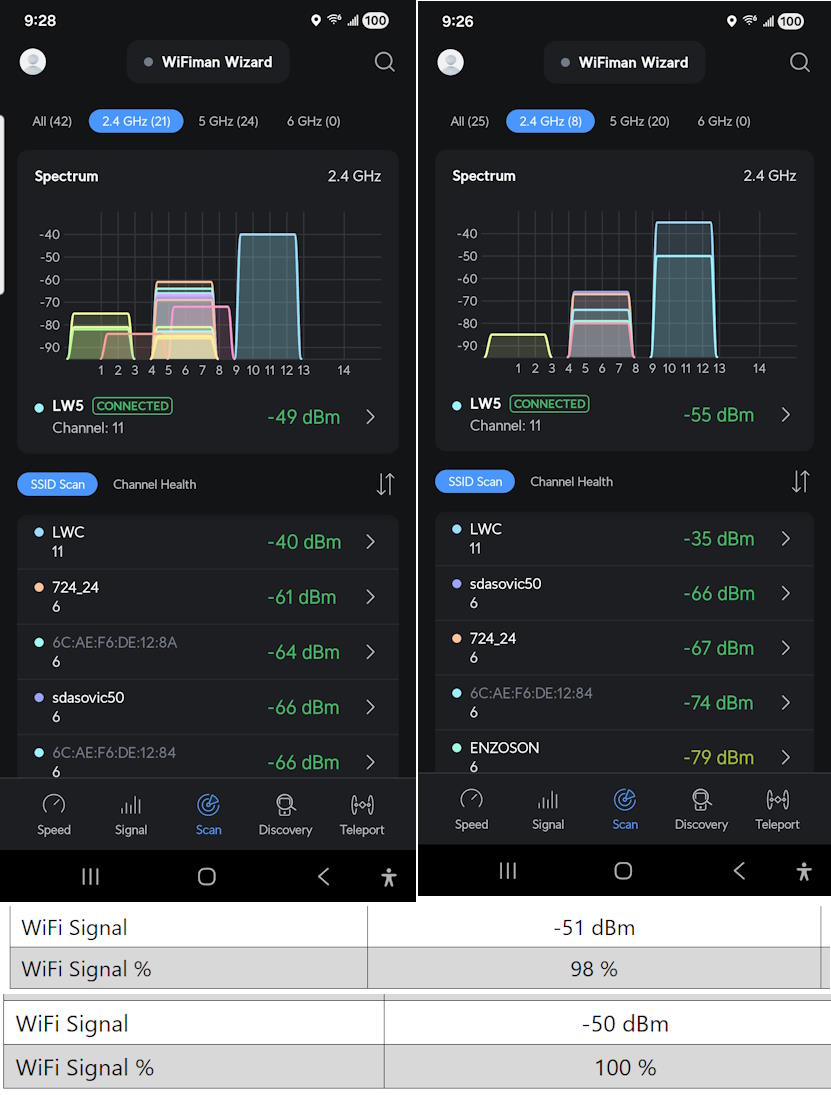
Signal strength recorded by android wifi app and blaQ pages (all within a db or so):
before… -55db @ 90%
now… -49db @ 100% to -52db @ 96%
… should have made zero diff, but it was HUUUGE
-55 dBm is considered by experts to be ideal for most applications and typical in well-designed deployment
No network is perfect but the two blaQs are literally sitting on the two MyQ door openers which, have been working for 8+ years without a hitch (4 router changes, same physical location in home)
I recorded signal info at both blaQ locations
LWC network on Ch11.
No neighbor SSIDs are on Channel 11, so no interference.
Signals are solid, as is also recorded by the blaQ web pages
Konnected blaQ / ESPHome does not handle short term hiccups / disconnects with resiliency. blaQ maybe not do a full reboot but it definitely takes 30 to 60 seconds to get a response from the web page so something is happening there, especially since half the time it gave no response.
The garage wifi was always ideal signal strength and quality. Easily enough for MyQ devices. blaQ devices may have really old wifi radios and/or need stronger wifi antennas.
side note": when testing multiple wifi cams (~20 different makes and models) over the years, I’ve seen that many/most cheap cams have old radios and/or weak antennas… they bounce on/off the network like the blaQs did for me.
also, I maybe got lucky and opened the web page of one at the right time to catch this error in the log… [api:156]No clients; rebooting
Never seen that before. Looked it up and it seem that it reboots if there is no connection but the reboot_timeout is not configurable… far from ideal. We should be allowed to enable/disable and set the timeout time. There are many reasons non-configurable auto-reboots are not a good idea 99% of the time for IOT devices.
The WiFi module inside, antenna design, and all of the low-level networking code is provided by Espressif. Specifically, the GDO blaQ uses the ESP32-S3 Mini-1 module with integrated PCB antenna. We literally can’t touch the antenna because that would invalidate the FCC certification of the module. Networking libraries are provided by ESP-IDF. The API layer and web server layer is provided by ESPHome.
At Konnected, we just put the pieces together in a nice hardware package and, handle the communication with the garage opener, and integrations with smart home apps. I think you’re giving me too much credit for being able to influence the network characteristics of the ESP32. That’s way beyond our scope of engineering.
Yes, this is default behavior of the ESPHome Native API. The timeout is configurable using the reboot_timeout configuration parameter. We don’t expose that variable in the Konnected app config tool, but you can instead disable the Native API in the Konnected app > device Settings, if you’re not using it. Home Assistant is a Native API client so you would need to leave it enabled to use Home Assistant.
Maybe some EMI from the motors or their electronics are a factor here. Try mounting the blaQ about 20cm or so away from any other transmitter.
@nate I gave it a few days but these are just not stable. Both of them go offline frequently.
and the signal is as good as anyone can get. I’ll try mounting them 1ft above the openers (today they are sitting on the opener) but it 99.9% unlikely that will change anything.
Its likely I’ll need to return these since either we have defective hardware or you have a software problem… either way, they are stable for automation use as they show incorrect status many times a day - we cant have that.
Remember that RSSI measures signal strength, not quality. An analogy is like sound – you may be able to 100% hear a speaker in the garage, but if you have another voice blasting directly into your ear, you may not be able understand what the intended voice is saying even though you can hear it.
Interference from transmitters, motors, or electronics in the opener can absolutely impact signal quality, even if RSSI is technically excellent.
The FCC generally requires 20cm of separation between transmitters to operate to spec.
I moved them 12” up above the openers, that did not help, immediately 1 started acting up.
I moved 1 first, then moved 2 (at the time you see the door Opened). So within about 10 minutes after I moved 1, it started disconnecting again. The logs below shows two separate times with problems.
that Wifi is currently…
WiFi Signal
-65 dBm
WiFi Signal %
70 %
as a reminder, there are NO other networks on that channel (ch11) that measure ANY db at all. None. So we’ve eliminated interference. I’ve also tried multiple different tweaks for the professional settings on the 2.4GHz radio, including lowering the power levels two separate settings… the problem is the blaQ device, there is no other way around it. I have a lot of devices on my wifi, none have a problem except the blaQs
Time Level Tag Message
16:02:55 [D] [sensor:135]
‘WiFi Signal’: Sending state -63.00000 dBm with 0 decimals of accuracy
16:02:56 [D] [sensor:135]
‘WiFi Signal %’: Sending state 74.00000 % with 0 decimals of accuracy
16:02:56 [D] [sensor:135]
‘Uptime’: Sending state 528083.62500 s with 0 decimals of accuracy
16:03:17 [D] [sensor:135]
‘Heap Free’: Sending state 237948.00000 B with 0 decimals of accuracy
16:03:48 [D] [sensor:135]
‘Heap Free’: Sending state 237968.00000 B with 0 decimals of accuracy
16:03:55 [D] [sensor:135]
‘WiFi Signal’: Sending state -62.00000 dBm with 0 decimals of accuracy
16:03:55 [D] [sensor:135]
‘WiFi Signal %’: Sending state 76.00000 % with 0 decimals of accuracy
16:03:56 [D] [sensor:135]
‘Uptime’: Sending state 528143.62500 s with 0 decimals of accuracy
16:04:17 [D] [sensor:135]
‘Heap Free’: Sending state 237948.00000 B with 0 decimals of accuracy
16:06:01 [D] [sensor:135]
‘Heap Free’: Sending state 234812.00000 B with 0 decimals of accuracy
16:06:01 [D] [sensor:135]
‘WiFi Signal’: Sending state -65.00000 dBm with 0 decimals of accuracy
16:06:01 [D] [sensor:135]
‘WiFi Signal %’: Sending state 70.00000 % with 0 decimals of accuracy
16:06:01 [D] [sensor:135]
‘Uptime’: Sending state 528203.62500 s with 0 decimals of accuracy
16:06:01 [D] [sensor:135]
‘Heap Free’: Sending state 228604.00000 B with 0 decimals of accuracy
16:06:36 [D] [sensor:135]
‘Heap Free’: Sending state 225484.00000 B with 0 decimals of accuracy
16:06:36 [D] [sensor:135]
‘WiFi Signal’: Sending state -64.00000 dBm with 0 decimals of accuracy
16:06:36 [D] [sensor:135]
‘WiFi Signal %’: Sending state 72.00000 % with 0 decimals of accuracy
16:06:36 [D] [sensor:135]
‘Uptime’: Sending state 528263.68750 s with 0 decimals of accuracy
16:06:36 [W] [api.connection:213]
Home Assistant 2025.12.5 (192.168.2.61) is unresponsive; disconnecting
16:06:38 [W] [component:333]
api set Warning flag: unspecified
16:06:38 [D] [sensor:135]
‘Heap Free’: Sending state 233656.00000 B with 0 decimals of accuracy
16:06:38 [D] [api:136]
Accept 192.168.2.61
16:06:38 [W] [component:373]
api cleared Warning flag
16:06:38 [D] [status_led:030]
Restoring light state OFF
16:06:38 [D] [api.connection:1398]
Home Assistant 2025.12.5 (192.168.2.61) connected
16:06:47 [D] [sensor:135]
‘Heap Free’: Sending state 237740.00000 B with 0 decimals of accuracy
16:06:55 [D] [sensor:135]
‘WiFi Signal’: Sending state -65.00000 dBm with 0 decimals of accuracy
16:06:56 [D] [sensor:135]
‘WiFi Signal %’: Sending state 70.00000 % with 0 decimals of accuracy
16:06:56 [D] [sensor:135]
‘Uptime’: Sending state 528323.68750 s with 0 decimals of accuracy
16:08:01 [D] [sensor:135]
‘Heap Free’: Sending state 233268.00000 B with 0 decimals of accuracy
16:08:01 [D] [sensor:135]
‘Heap Free’: Sending state 230104.00000 B with 0 decimals of accuracy
16:08:01 [D] [sensor:135]
‘WiFi Signal’: Sending state -65.00000 dBm with 0 decimals of accuracy
16:08:01 [D] [sensor:135]
‘WiFi Signal %’: Sending state 70.00000 % with 0 decimals of accuracy
16:08:01 [D] [sensor:135]
‘Uptime’: Sending state 528383.68750 s with 0 decimals of accuracy
16:08:17 [D] [sensor:135]
‘Heap Free’: Sending state 237936.00000 B with 0 decimals of accuracy
16:09:05 [D] [sensor:135]
‘Heap Free’: Sending state 233260.00000 B with 0 decimals of accuracy
16:09:05 [D] [sensor:135]
‘WiFi Signal’: Sending state -64.00000 dBm with 0 decimals of accuracy
16:09:05 [D] [sensor:135]
‘WiFi Signal %’: Sending state 72.00000 % with 0 decimals of accuracy
16:09:05 [D] [sensor:135]
‘Uptime’: Sending state 528443.68750 s with 0 decimals of accuracy
16:09:08 [W] [api.connection:213]
Home Assistant 2025.12.5 (192.168.2.61) is unresponsive; disconnecting
16:09:09 [W] [component:333]
api set Warning flag: unspecified
16:09:09 [D] [api:136]
Accept 192.168.2.61
16:09:09 [W] [component:373]
api cleared Warning flag
16:09:09 [D] [status_led:030]
Restoring light state OFF
16:09:12 [D] [api.connection:1398]
Home Assistant 2025.12.5 (192.168.2.61) connected
16:09:17 [D] [sensor:135]
‘Heap Free’: Sending state 238016.00000 B with 0 decimals of accuracy
16:09:47 [D] [sensor:135]
‘Heap Free’: Sending state 237984.00000 B with 0 decimals of accuracy
16:09:55 [D] [sensor:135]
‘WiFi Signal’: Sending state -65.00000 dBm with 0 decimals of accuracy
16:09:56 [D] [sensor:135]
‘WiFi Signal %’: Sending state 70.00000 % with 0 decimals of accuracy
16:09:56 [D] [sensor:135]
‘Uptime’: Sending state 528503.68750 s with 0 decimals of accuracy
Thanks for the log. Looks like the problem has nothing to do with wifi signal at all:
16:06:36 [W] [api.connection:213] Home Assistant 2025.12.5 (192.168.2.61) is unresponsive; disconnecting
16:06:38 [W] [component:333] api set Warning flag: unspecified
16:06:38 [D] [sensor:135] ‘Heap Free’: Sending state 233656.00000 B with 0 decimals of accuracy
16:06:38 [D] [api:136] Accept 192.168.2.61
16:06:38 [W] [component:373] api cleared Warning flag
16:06:38 [D] [api.connection:1398] Home Assistant 2025.12.5 (192.168.2.61) connected
This indicates that HA is not responding to some messages so it’s aborting the connection, then HA reconnects 2 sec later.
16:09:05 [D] [sensor:135] ‘Uptime’: Sending state 528443.68750 s with 0 decimals of accuracy
...
16:09:56 [D] [sensor:135] ‘Uptime’: Sending state 528503.68750 s with 0 decimals of accuracy
Uptime is continuously increasing, so the device is stable and not rebooting. In fact, it’s been up for a solid 528503 seconds which is 146 hours or 6 days.
The fact that you were able to stream these logs means that the wifi is working just fine.
I’m not sure what would be causing this on the Home Assistant side. I haven’t seen this before. The next thing I would check is the home-assistant.log on your HA server.
The problem is your units – they literally drop offline (see Ping log below). We cannot connect to the web UI or even Ping them. If may not be rebooting, but its resetting itself.
Either the hardware or FW is defective, sorry, I wish there was an easier answer, there is NO other answer. I’ve spent tons of time on this. Looks at the Pings of your blaQ and then the MyQ literally in the same location. Nothing but Problems with blaQs, zero problems with MyQ
from HA log….
Logger: aioesphomeapi.reconnect_logic
Source: runner.py:289
First occurred: 6:20:21 AM (3 occurrences)
Last logged: 7:34:31 AM

Can’t connect to ESPHome API for konnected-9888e007a1ec @ 192.168.2.63: Error connecting to [AddrInfo(family=<AddressFamily.AF_INET: 2>, type=<SocketKind.SOCK_STREAM: 1>, proto=6, sockaddr=IPv4Sockaddr(address=‘192.168.2.63’, port=6053))]: [Errno 113] Connect call failed (‘192.168.2.63’, 6053) (SocketAPIError)
Can’t connect to ESPHome API for konnected-b43a45b5b968 @ 192.168.2.62: Error connecting to [AddrInfo(family=<AddressFamily.AF_INET: 2>, type=<SocketKind.SOCK_STREAM: 1>, proto=6, sockaddr=IPv4Sockaddr(address=‘192.168.2.62’, port=6053))]: [Errno 113] Connect call failed (‘192.168.2.62’, 6053) (SocketAPIError)
MyQ pings…
Pinging 192.168.2.19 with 32 bytes of data:
Reply from 192.168.2.19: bytes=32 time=293ms TTL=255
Reply from 192.168.2.19: bytes=32 time=348ms TTL=255
Reply from 192.168.2.19: bytes=32 time=95ms TTL=255
Reply from 192.168.2.19: bytes=32 time=84ms TTL=255
Reply from 192.168.2.19: bytes=32 time=114ms TTL=255
Reply from 192.168.2.19: bytes=32 time=410ms TTL=255
Reply from 192.168.2.19: bytes=32 time=62ms TTL=255
Reply from 192.168.2.19: bytes=32 time=70ms TTL=255
Reply from 192.168.2.19: bytes=32 time=52ms TTL=255
Reply from 192.168.2.19: bytes=32 time=168ms TTL=255
Reply from 192.168.2.19: bytes=32 time=92ms TTL=255
Reply from 192.168.2.19: bytes=32 time=375ms TTL=255
Reply from 192.168.2.19: bytes=32 time=28ms TTL=255
Reply from 192.168.2.19: bytes=32 time=1208ms TTL=255
Reply from 192.168.2.19: bytes=32 time=352ms TTL=255
Reply from 192.168.2.19: bytes=32 time=205ms TTL=255
Reply from 192.168.2.19: bytes=32 time=156ms TTL=255
Reply from 192.168.2.19: bytes=32 time=157ms TTL=255
Reply from 192.168.2.19: bytes=32 time=50ms TTL=255
Reply from 192.168.2.19: bytes=32 time=100ms TTL=255
Reply from 192.168.2.19: bytes=32 time=109ms TTL=255
Reply from 192.168.2.19: bytes=32 time=152ms TTL=255
Reply from 192.168.2.19: bytes=32 time=151ms TTL=255
Reply from 192.168.2.19: bytes=32 time=988ms TTL=255
Reply from 192.168.2.19: bytes=32 time=428ms TTL=255
Reply from 192.168.2.19: bytes=32 time=80ms TTL=255
Reply from 192.168.2.19: bytes=32 time=270ms TTL=255
Reply from 192.168.2.19: bytes=32 time=146ms TTL=255
Reply from 192.168.2.19: bytes=32 time=138ms TTL=255
Reply from 192.168.2.19: bytes=32 time=303ms TTL=255
Reply from 192.168.2.19: bytes=32 time=342ms TTL=255
Reply from 192.168.2.19: bytes=32 time=820ms TTL=255
Reply from 192.168.2.19: bytes=32 time=376ms TTL=255
Reply from 192.168.2.19: bytes=32 time=365ms TTL=255
Reply from 192.168.2.19: bytes=32 time=481ms TTL=255
Reply from 192.168.2.19: bytes=32 time=659ms TTL=255
Reply from 192.168.2.19: bytes=32 time=136ms TTL=255
Reply from 192.168.2.19: bytes=32 time=576ms TTL=255
Reply from 192.168.2.19: bytes=32 time=709ms TTL=255
Reply from 192.168.2.19: bytes=32 time=329ms TTL=255
Reply from 192.168.2.19: bytes=32 time=347ms TTL=255
Reply from 192.168.2.19: bytes=32 time=304ms TTL=255
Reply from 192.168.2.19: bytes=32 time=221ms TTL=255
Reply from 192.168.2.19: bytes=32 time=165ms TTL=255
Reply from 192.168.2.19: bytes=32 time=198ms TTL=255
Reply from 192.168.2.19: bytes=32 time=106ms TTL=255
Reply from 192.168.2.19: bytes=32 time=95ms TTL=255
Reply from 192.168.2.19: bytes=32 time=136ms TTL=255
Reply from 192.168.2.19: bytes=32 time=185ms TTL=255
Reply from 192.168.2.19: bytes=32 time=95ms TTL=255
Reply from 192.168.2.19: bytes=32 time=650ms TTL=255
Reply from 192.168.2.19: bytes=32 time=89ms TTL=255
Reply from 192.168.2.19: bytes=32 time=233ms TTL=255
Reply from 192.168.2.19: bytes=32 time=1175ms TTL=255
Reply from 192.168.2.19: bytes=32 time=634ms TTL=255
Reply from 192.168.2.19: bytes=32 time=557ms TTL=255
Reply from 192.168.2.19: bytes=32 time=14ms TTL=255
Reply from 192.168.2.19: bytes=32 time=56ms TTL=255
Reply from 192.168.2.19: bytes=32 time=173ms TTL=255
Reply from 192.168.2.19: bytes=32 time=160ms TTL=255
Reply from 192.168.2.19: bytes=32 time=279ms TTL=255
Reply from 192.168.2.19: bytes=32 time=186ms TTL=255
Reply from 192.168.2.19: bytes=32 time=444ms TTL=255
Reply from 192.168.2.19: bytes=32 time=46ms TTL=255
Reply from 192.168.2.19: bytes=32 time=467ms TTL=255
Reply from 192.168.2.19: bytes=32 time=274ms TTL=255
Reply from 192.168.2.19: bytes=32 time=146ms TTL=255
Reply from 192.168.2.19: bytes=32 time=112ms TTL=255
Reply from 192.168.2.19: bytes=32 time=27ms TTL=255
Reply from 192.168.2.19: bytes=32 time=32ms TTL=255
Reply from 192.168.2.19: bytes=32 time=68ms TTL=255
Reply from 192.168.2.19: bytes=32 time=83ms TTL=255
Reply from 192.168.2.19: bytes=32 time=47ms TTL=255
Reply from 192.168.2.19: bytes=32 time=915ms TTL=255
Reply from 192.168.2.19: bytes=32 time=337ms TTL=255
Reply from 192.168.2.19: bytes=32 time=197ms TTL=255
Reply from 192.168.2.19: bytes=32 time=637ms TTL=255
Reply from 192.168.2.19: bytes=32 time=212ms TTL=255
Reply from 192.168.2.19: bytes=32 time=158ms TTL=255
Reply from 192.168.2.19: bytes=32 time=124ms TTL=255
Reply from 192.168.2.19: bytes=32 time=103ms TTL=255
Reply from 192.168.2.19: bytes=32 time=166ms TTL=255
Reply from 192.168.2.19: bytes=32 time=985ms TTL=255
Reply from 192.168.2.19: bytes=32 time=360ms TTL=255
Reply from 192.168.2.19: bytes=32 time=653ms TTL=255
Reply from 192.168.2.19: bytes=32 time=166ms TTL=255
Reply from 192.168.2.19: bytes=32 time=512ms TTL=255
Reply from 192.168.2.19: bytes=32 time=510ms TTL=255
Reply from 192.168.2.19: bytes=32 time=1022ms TTL=255
Reply from 192.168.2.19: bytes=32 time=716ms TTL=255
Reply from 192.168.2.19: bytes=32 time=1297ms TTL=255
Reply from 192.168.2.19: bytes=32 time=991ms TTL=255
Reply from 192.168.2.19: bytes=32 time=330ms TTL=255
Reply from 192.168.2.19: bytes=32 time=234ms TTL=255
Reply from 192.168.2.19: bytes=32 time=130ms TTL=255
Reply from 192.168.2.19: bytes=32 time=63ms TTL=255
Reply from 192.168.2.19: bytes=32 time=195ms TTL=255
Reply from 192.168.2.19: bytes=32 time=256ms TTL=255
Reply from 192.168.2.19: bytes=32 time=48ms TTL=255
Reply from 192.168.2.19: bytes=32 time=182ms TTL=255
Reply from 192.168.2.19: bytes=32 time=180ms TTL=255
Reply from 192.168.2.19: bytes=32 time=46ms TTL=255
Reply from 192.168.2.19: bytes=32 time=1070ms TTL=255
Reply from 192.168.2.19: bytes=32 time=872ms TTL=255
Reply from 192.168.2.19: bytes=32 time=515ms TTL=255
Reply from 192.168.2.19: bytes=32 time=139ms TTL=255
Reply from 192.168.2.19: bytes=32 time=332ms TTL=255
Reply from 192.168.2.19: bytes=32 time=185ms TTL=255
Reply from 192.168.2.19: bytes=32 time=419ms TTL=255
Reply from 192.168.2.19: bytes=32 time=121ms TTL=255
Reply from 192.168.2.19: bytes=32 time=128ms TTL=255
Reply from 192.168.2.19: bytes=32 time=30ms TTL=255
Reply from 192.168.2.19: bytes=32 time=248ms TTL=255
Reply from 192.168.2.19: bytes=32 time=74ms TTL=255
Reply from 192.168.2.19: bytes=32 time=192ms TTL=255
Reply from 192.168.2.19: bytes=32 time=155ms TTL=255
Reply from 192.168.2.19: bytes=32 time=204ms TTL=255
Reply from 192.168.2.19: bytes=32 time=21ms TTL=255
Reply from 192.168.2.19: bytes=32 time=399ms TTL=255
Reply from 192.168.2.19: bytes=32 time=33ms TTL=255
Reply from 192.168.2.19: bytes=32 time=134ms TTL=255
Reply from 192.168.2.19: bytes=32 time=26ms TTL=255
Reply from 192.168.2.19: bytes=32 time=59ms TTL=255
Reply from 192.168.2.19: bytes=32 time=8ms TTL=255
Reply from 192.168.2.19: bytes=32 time=305ms TTL=255
Reply from 192.168.2.19: bytes=32 time=189ms TTL=255
Reply from 192.168.2.19: bytes=32 time=630ms TTL=255
Reply from 192.168.2.19: bytes=32 time=1204ms TTL=255
Reply from 192.168.2.19: bytes=32 time=489ms TTL=255
Reply from 192.168.2.19: bytes=32 time=583ms TTL=255
Reply from 192.168.2.19: bytes=32 time=124ms TTL=255
blaQ pings…
Pinging 192.168.2.62 with 32 bytes of data:
Reply from 192.168.2.62: bytes=32 time=1867ms TTL=64
Reply from 192.168.2.62: bytes=32 time=15ms TTL=64
Reply from 192.168.2.62: bytes=32 time=2047ms TTL=64
Request timed out.
Request timed out.
Request timed out.
Request timed out.
Reply from 192.168.2.62: bytes=32 time=3371ms TTL=64
Reply from 192.168.2.62: bytes=32 time=22ms TTL=64
Reply from 192.168.2.62: bytes=32 time=1776ms TTL=64
Reply from 192.168.2.62: bytes=32 time=714ms TTL=64
Reply from 192.168.2.62: bytes=32 time=547ms TTL=64
Reply from 192.168.2.62: bytes=32 time=781ms TTL=64
Request timed out.
Request timed out.
Request timed out.
Request timed out.
Request timed out.
Reply from 192.168.2.62: bytes=32 time=3179ms TTL=64
Reply from 192.168.2.62: bytes=32 time=3ms TTL=64
Reply from 192.168.2.62: bytes=32 time=2528ms TTL=64
Reply from 192.168.2.62: bytes=32 time=1992ms TTL=64
Request timed out.
Reply from 192.168.2.62: bytes=32 time=1243ms TTL=64
Reply from 192.168.2.62: bytes=32 time=744ms TTL=64
Reply from 192.168.2.62: bytes=32 time=1547ms TTL=64
Request timed out.
Request timed out.
Request timed out.
Reply from 192.168.2.62: bytes=32 time=1351ms TTL=64
Reply from 192.168.2.62: bytes=32 time=55ms TTL=64
Reply from 192.168.2.62: bytes=32 time=625ms TTL=64
Reply from 192.168.2.62: bytes=32 time=668ms TTL=64
Reply from 192.168.2.62: bytes=32 time=956ms TTL=64
Reply from 192.168.2.62: bytes=32 time=362ms TTL=64
Reply from 192.168.2.62: bytes=32 time=1749ms TTL=64
Reply from 192.168.2.62: bytes=32 time=38ms TTL=64
Request timed out.
Request timed out.
Request timed out.
Request timed out.
Request timed out.
Request timed out.
Reply from 192.168.2.62: bytes=32 time=417ms TTL=64
Reply from 192.168.2.62: bytes=32 time=361ms TTL=64
Reply from 192.168.2.62: bytes=32 time=542ms TTL=64
Reply from 192.168.2.62: bytes=32 time=161ms TTL=64
Reply from 192.168.2.62: bytes=32 time=618ms TTL=64
Reply from 192.168.2.62: bytes=32 time=1042ms TTL=64
Reply from 192.168.2.62: bytes=32 time=153ms TTL=64
Reply from 192.168.2.62: bytes=32 time=461ms TTL=64
Reply from 192.168.2.62: bytes=32 time=248ms TTL=64
Reply from 192.168.2.62: bytes=32 time=407ms TTL=64
Reply from 192.168.2.62: bytes=32 time=72ms TTL=64
Reply from 192.168.2.62: bytes=32 time=311ms TTL=64
Reply from 192.168.2.62: bytes=32 time=547ms TTL=64
Reply from 192.168.2.62: bytes=32 time=657ms TTL=64
Reply from 192.168.2.62: bytes=32 time=674ms TTL=64
Reply from 192.168.2.62: bytes=32 time=352ms TTL=64
Request timed out.
Reply from 192.168.2.62: bytes=32 time=479ms TTL=64
Reply from 192.168.2.62: bytes=32 time=527ms TTL=64
Reply from 192.168.2.62: bytes=32 time=2233ms TTL=64
Reply from 192.168.2.62: bytes=32 time=649ms TTL=64
Reply from 192.168.2.62: bytes=32 time=222ms TTL=64
Reply from 192.168.2.62: bytes=32 time=178ms TTL=64
Reply from 192.168.2.62: bytes=32 time=51ms TTL=64
Reply from 192.168.2.62: bytes=32 time=2197ms TTL=64
Request timed out.
Request timed out.
Reply from 192.168.2.11: Destination host unreachable.
Reply from 192.168.2.11: Destination host unreachable.
Reply from 192.168.2.11: Destination host unreachable.
Reply from 192.168.2.11: Destination host unreachable.
Reply from 192.168.2.62: bytes=32 time=569ms TTL=64
Reply from 192.168.2.62: bytes=32 time=366ms TTL=64
Request timed out.
Reply from 192.168.2.62: bytes=32 time=2032ms TTL=64
Reply from 192.168.2.62: bytes=32 time=1155ms TTL=64
Reply from 192.168.2.62: bytes=32 time=1656ms TTL=64
Reply from 192.168.2.62: bytes=32 time=661ms TTL=64
Reply from 192.168.2.62: bytes=32 time=298ms TTL=64
Reply from 192.168.2.62: bytes=32 time=294ms TTL=64
Reply from 192.168.2.62: bytes=32 time=51ms TTL=64
Reply from 192.168.2.62: bytes=32 time=309ms TTL=64
Reply from 192.168.2.62: bytes=32 time=219ms TTL=64
Reply from 192.168.2.62: bytes=32 time=166ms TTL=64
Reply from 192.168.2.62: bytes=32 time=431ms TTL=64
Reply from 192.168.2.62: bytes=32 time=1278ms TTL=64
Reply from 192.168.2.62: bytes=32 time=44ms TTL=64
Reply from 192.168.2.62: bytes=32 time=847ms TTL=64
Reply from 192.168.2.62: bytes=32 time=1088ms TTL=64
Reply from 192.168.2.62: bytes=32 time=548ms TTL=64
Reply from 192.168.2.62: bytes=32 time=680ms TTL=64
Request timed out.
Reply from 192.168.2.62: bytes=32 time=296ms TTL=64
Reply from 192.168.2.62: bytes=32 time=259ms TTL=64
Reply from 192.168.2.62: bytes=32 time=679ms TTL=64
Reply from 192.168.2.62: bytes=32 time=662ms TTL=64
Reply from 192.168.2.62: bytes=32 time=461ms TTL=64
Reply from 192.168.2.62: bytes=32 time=415ms TTL=64
Reply from 192.168.2.62: bytes=32 time=327ms TTL=64
Request timed out.
Request timed out.
Reply from 192.168.2.62: bytes=32 time=401ms TTL=64
Request timed out.
Request timed out.
Request timed out.
Reply from 192.168.2.62: bytes=32 time=1803ms TTL=64
Reply from 192.168.2.62: bytes=32 time=65ms TTL=64
Reply from 192.168.2.62: bytes=32 time=359ms TTL=64
Reply from 192.168.2.62: bytes=32 time=328ms TTL=64
Reply from 192.168.2.62: bytes=32 time=1421ms TTL=64
Reply from 192.168.2.62: bytes=32 time=1461ms TTL=64
Reply from 192.168.2.62: bytes=32 time=1663ms TTL=64
Reply from 192.168.2.62: bytes=32 time=1091ms TTL=64
Request timed out.
Request timed out.
Reply from 192.168.2.62: bytes=32 time=1736ms TTL=64
Reply from 192.168.2.62: bytes=32 time=1298ms TTL=64
Reply from 192.168.2.62: bytes=32 time=948ms TTL=64
Reply from 192.168.2.62: bytes=32 time=1672ms TTL=64
Reply from 192.168.2.62: bytes=32 time=3ms TTL=64
Reply from 192.168.2.62: bytes=32 time=240ms TTL=64
Reply from 192.168.2.62: bytes=32 time=478ms TTL=64
Reply from 192.168.2.62: bytes=32 time=1013ms TTL=64
Reply from 192.168.2.62: bytes=32 time=303ms TTL=64
Reply from 192.168.2.62: bytes=32 time=485ms TTL=64
Reply from 192.168.2.62: bytes=32 time=335ms TTL=64
Reply from 192.168.2.62: bytes=32 time=140ms TTL=64
Request timed out.
Request timed out.
Request timed out.
Request timed out.
Request timed out.
Request timed out.
Reply from 192.168.2.62: bytes=32 time=2106ms TTL=64
Reply from 192.168.2.62: bytes=32 time=362ms TTL=64
Reply from 192.168.2.62: bytes=32 time=255ms TTL=64
Reply from 192.168.2.62: bytes=32 time=466ms TTL=64
Reply from 192.168.2.62: bytes=32 time=420ms TTL=64
Reply from 192.168.2.62: bytes=32 time=294ms TTL=64
Reply from 192.168.2.62: bytes=32 time=235ms TTL=64
Reply from 192.168.2.62: bytes=32 time=273ms TTL=64
Reply from 192.168.2.62: bytes=32 time=322ms TTL=64
Reply from 192.168.2.62: bytes=32 time=430ms TTL=64
Reply from 192.168.2.62: bytes=32 time=144ms TTL=64
Reply from 192.168.2.62: bytes=32 time=402ms TTL=64
Reply from 192.168.2.62: bytes=32 time=273ms TTL=64
Reply from 192.168.2.62: bytes=32 time=861ms TTL=64
Reply from 192.168.2.62: bytes=32 time=1082ms TTL=64
Reply from 192.168.2.62: bytes=32 time=50ms TTL=64
Reply from 192.168.2.62: bytes=32 time=135ms TTL=64
Reply from 192.168.2.62: bytes=32 time=351ms TTL=64
Reply from 192.168.2.62: bytes=32 time=1261ms TTL=64
Reply from 192.168.2.62: bytes=32 time=74ms TTL=64
Reply from 192.168.2.62: bytes=32 time=455ms TTL=64
Reply from 192.168.2.62: bytes=32 time=125ms TTL=64
Reply from 192.168.2.62: bytes=32 time=1874ms TTL=64
Request timed out.
Request timed out.
Request timed out.
Request timed out.
Request timed out.
Reply from 192.168.2.62: bytes=32 time=3083ms TTL=64
Reply from 192.168.2.62: bytes=32 time=65ms TTL=64
Reply from 192.168.2.62: bytes=32 time=193ms TTL=64
Reply from 192.168.2.62: bytes=32 time=756ms TTL=64
Reply from 192.168.2.62: bytes=32 time=2112ms TTL=64
Reply from 192.168.2.62: bytes=32 time=1408ms TTL=64
Request timed out.
Request timed out.
Request timed out.
Reply from 192.168.2.62: bytes=32 time=915ms TTL=64
Reply from 192.168.2.62: bytes=32 time=221ms TTL=64
Reply from 192.168.2.62: bytes=32 time=414ms TTL=64
Reply from 192.168.2.62: bytes=32 time=424ms TTL=64
Reply from 192.168.2.62: bytes=32 time=844ms TTL=64
Reply from 192.168.2.62: bytes=32 time=545ms TTL=64
Reply from 192.168.2.62: bytes=32 time=359ms TTL=64
Reply from 192.168.2.62: bytes=32 time=441ms TTL=64
Reply from 192.168.2.62: bytes=32 time=226ms TTL=64
Reply from 192.168.2.62: bytes=32 time=411ms TTL=64
Reply from 192.168.2.62: bytes=32 time=351ms TTL=64
Reply from 192.168.2.62: bytes=32 time=1428ms TTL=64
Reply from 192.168.2.62: bytes=32 time=308ms TTL=64
Reply from 192.168.2.62: bytes=32 time=221ms TTL=64
Reply from 192.168.2.62: bytes=32 time=241ms TTL=64
Request timed out.
Request timed out.
Request timed out.
Request timed out.
Request timed out.
Request timed out.
Request timed out.
Request timed out.
Request timed out.
Request timed out.
Request timed out.
Reply from 192.168.2.62: bytes=32 time=509ms TTL=64
Reply from 192.168.2.62: bytes=32 time=452ms TTL=64
Reply from 192.168.2.62: bytes=32 time=286ms TTL=64
Request timed out.
Request timed out.
Request timed out.
Reply from 192.168.2.11: Destination host unreachable.
Reply from 192.168.2.11: Destination host unreachable.
Reply from 192.168.2.11: Destination host unreachable.
Reply from 192.168.2.62: bytes=32 time=736ms TTL=64
Reply from 192.168.2.62: bytes=32 time=714ms TTL=64
Request timed out.
Reply from 192.168.2.62: bytes=32 time=209ms TTL=64
Request timed out.
Reply from 192.168.2.62: bytes=32 time=49ms TTL=64
Reply from 192.168.2.62: bytes=32 time=398ms TTL=64
Reply from 192.168.2.62: bytes=32 time=1152ms TTL=64
Reply from 192.168.2.62: bytes=32 time=574ms TTL=64
Reply from 192.168.2.62: bytes=32 time=506ms TTL=64
Reply from 192.168.2.62: bytes=32 time=37ms TTL=64
Reply from 192.168.2.62: bytes=32 time=475ms TTL=64
Reply from 192.168.2.62: bytes=32 time=202ms TTL=64
Request timed out.
Reply from 192.168.2.62: bytes=32 time=281ms TTL=64
Reply from 192.168.2.62: bytes=32 time=489ms TTL=64
Reply from 192.168.2.62: bytes=32 time=408ms TTL=64
Reply from 192.168.2.62: bytes=32 time=1760ms TTL=64
Reply from 192.168.2.62: bytes=32 time=380ms TTL=64
Reply from 192.168.2.62: bytes=32 time=471ms TTL=64
Reply from 192.168.2.62: bytes=32 time=205ms TTL=64
Reply from 192.168.2.62: bytes=32 time=218ms TTL=64
Reply from 192.168.2.62: bytes=32 time=34ms TTL=64
Reply from 192.168.2.62: bytes=32 time=291ms TTL=64
Reply from 192.168.2.62: bytes=32 time=197ms TTL=64
Request timed out.
Request timed out.
Request timed out.
Reply from 192.168.2.11: Destination host unreachable.
Reply from 192.168.2.11: Destination host unreachable.
Reply from 192.168.2.11: Destination host unreachable.
Reply from 192.168.2.62: bytes=32 time=946ms TTL=64
Reply from 192.168.2.62: bytes=32 time=138ms TTL=64
Reply from 192.168.2.62: bytes=32 time=1866ms TTL=64
Reply from 192.168.2.62: bytes=32 time=1652ms TTL=64
Reply from 192.168.2.62: bytes=32 time=391ms TTL=64
Reply from 192.168.2.62: bytes=32 time=1896ms TTL=64
Reply from 192.168.2.62: bytes=32 time=2010ms TTL=64
Reply from 192.168.2.62: bytes=32 time=720ms TTL=64
Reply from 192.168.2.62: bytes=32 time=60ms TTL=64
Request timed out.
Reply from 192.168.2.62: bytes=32 time=249ms TTL=64
Reply from 192.168.2.62: bytes=32 time=1105ms TTL=64
Reply from 192.168.2.62: bytes=32 time=51ms TTL=64
Reply from 192.168.2.62: bytes=32 time=28ms TTL=64
Reply from 192.168.2.62: bytes=32 time=661ms TTL=64
Reply from 192.168.2.62: bytes=32 time=396ms TTL=64
Reply from 192.168.2.62: bytes=32 time=290ms TTL=64
Reply from 192.168.2.62: bytes=32 time=567ms TTL=64
Reply from 192.168.2.62: bytes=32 time=991ms TTL=64
Reply from 192.168.2.62: bytes=32 time=11ms TTL=64
Reply from 192.168.2.62: bytes=32 time=193ms TTL=64
Reply from 192.168.2.62: bytes=32 time=439ms TTL=64
Reply from 192.168.2.62: bytes=32 time=110ms TTL=64
Reply from 192.168.2.62: bytes=32 time=373ms TTL=64
Reply from 192.168.2.62: bytes=32 time=904ms TTL=64
Reply from 192.168.2.62: bytes=32 time=376ms TTL=64
Reply from 192.168.2.62: bytes=32 time=652ms TTL=64
Reply from 192.168.2.62: bytes=32 time=353ms TTL=64
Reply from 192.168.2.62: bytes=32 time=123ms TTL=64
Reply from 192.168.2.62: bytes=32 time=1148ms TTL=64
Request timed out.
Request timed out.
Request timed out.
Request timed out.
Reply from 192.168.2.62: bytes=32 time=3406ms TTL=64
Reply from 192.168.2.62: bytes=32 time=55ms TTL=64
Reply from 192.168.2.62: bytes=32 time=2420ms TTL=64
Request timed out.
Request timed out.
Request timed out.
Reply from 192.168.2.62: bytes=32 time=237ms TTL=64
Reply from 192.168.2.62: bytes=32 time=158ms TTL=64
Reply from 192.168.2.62: bytes=32 time=3008ms TTL=64
Reply from 192.168.2.62: bytes=32 time=16ms TTL=64
Reply from 192.168.2.62: bytes=32 time=634ms TTL=64
Reply from 192.168.2.62: bytes=32 time=666ms TTL=64
Reply from 192.168.2.62: bytes=32 time=913ms TTL=64
Reply from 192.168.2.62: bytes=32 time=542ms TTL=64
Reply from 192.168.2.62: bytes=32 time=301ms TTL=64
Reply from 192.168.2.62: bytes=32 time=30ms TTL=64
Reply from 192.168.2.62: bytes=32 time=459ms TTL=64
Reply from 192.168.2.62: bytes=32 time=376ms TTL=64
Reply from 192.168.2.62: bytes=32 time=1122ms TTL=64
Request timed out.
Request timed out.
Request timed out.
Request timed out.
Request timed out.
Request timed out.
Reply from 192.168.2.62: bytes=32 time=1354ms TTL=64
Reply from 192.168.2.62: bytes=32 time=877ms TTL=64
Reply from 192.168.2.62: bytes=32 time=629ms TTL=64
Reply from 192.168.2.62: bytes=32 time=1014ms TTL=64
Reply from 192.168.2.62: bytes=32 time=76ms TTL=64
Reply from 192.168.2.62: bytes=32 time=1090ms TTL=64
Reply from 192.168.2.62: bytes=32 time=2042ms TTL=64
Request timed out.
Reply from 192.168.2.62: bytes=32 time=2710ms TTL=64
Request timed out.
Request timed out.
Reply from 192.168.2.62: bytes=32 time=298ms TTL=64
Reply from 192.168.2.62: bytes=32 time=640ms TTL=64
Reply from 192.168.2.62: bytes=32 time=635ms TTL=64
Reply from 192.168.2.62: bytes=32 time=239ms TTL=64
Reply from 192.168.2.62: bytes=32 time=431ms TTL=64
Reply from 192.168.2.62: bytes=32 time=366ms TTL=64
Reply from 192.168.2.62: bytes=32 time=285ms TTL=64
Request timed out.
Request timed out.
Request timed out.
Reply from 192.168.2.62: bytes=32 time=2172ms TTL=64
Reply from 192.168.2.62: bytes=32 time=2522ms TTL=64
Request timed out.
Request timed out.
Request timed out.
Reply from 192.168.2.62: bytes=32 time=505ms TTL=64
Reply from 192.168.2.62: bytes=32 time=88ms TTL=64
Reply from 192.168.2.62: bytes=32 time=303ms TTL=64
Request timed out.
Reply from 192.168.2.62: bytes=32 time=1037ms TTL=64
Request timed out.
Reply from 192.168.2.62: bytes=32 time=383ms TTL=64
Reply from 192.168.2.62: bytes=32 time=201ms TTL=64
Reply from 192.168.2.62: bytes=32 time=532ms TTL=64
Reply from 192.168.2.62: bytes=32 time=1997ms TTL=64
Reply from 192.168.2.62: bytes=32 time=1211ms TTL=64
Reply from 192.168.2.62: bytes=32 time=262ms TTL=64

Ping statistics for 192.168.2.62:
Packets: Sent = 336, Received = 246, Lost = 90 (26% loss),
Approximate round trip times in milli-seconds:
Minimum = 3ms, Maximum = 3406ms, Average = 720ms
How did you capture the log yesterday then? Was that log streaming over WiFi? Via the command line or web browser?
If you’re able to stream the log continuously, then they couldn’t be dropping offline. If so, then the log stream would be interrupted, too.
The ping times look really suspicious. Normally on a local network it should be ~100ms or less.
Can you run a traceroute to see if there’s anything odd in the network routing to the device?
traceroute 192.168.2.62
or, on Windows:
tracert 192.168.2.62
Also, please check the logs on your Asus router for any clues. If the device is dropping offline you should see that in the DHCP logs. There are probably various logs available in the Asus router admin panel, so anything that you can find there that might indicate that it’s going offline would be helpful.
you’re missing the ping times that are long or failing ONLY to your devices. there is NOTHING wrong with my network. I’m done troubleshooting my network which has 60 total devices that work PERFECTLY, and 2 (YOUR DEVICES) that have problems.
contact me on email and reflash these to see if that fixes them, or replace them… or refund me.
I’m not replying here anymore.
blaQ TRACERT
1 * * * Request timed out.
2 296 ms 54 ms 38 ms 192.168.2.62