That sounds like more of a network issue to me. I’m monitoring mine currently and so far so good but my network will bug out every once in a while too and similar things happen. I setup my router to reboot every morning at 3am and that seems to prevent this issue.
Hey Ben. I’ve using the GDO blaQ, Software 1.4.1.2 on a Merlin MS105MYQ, and I’m experiencing exactly the same issues as you.
I can open the garage door, but it won’t close and when I check the logs it’s unavailable. It only seems to happen after hours of not operating.
I’ve tried a resync and it doesn’t work. The only thing that works is a reboot. Other than this issue the unit is great.
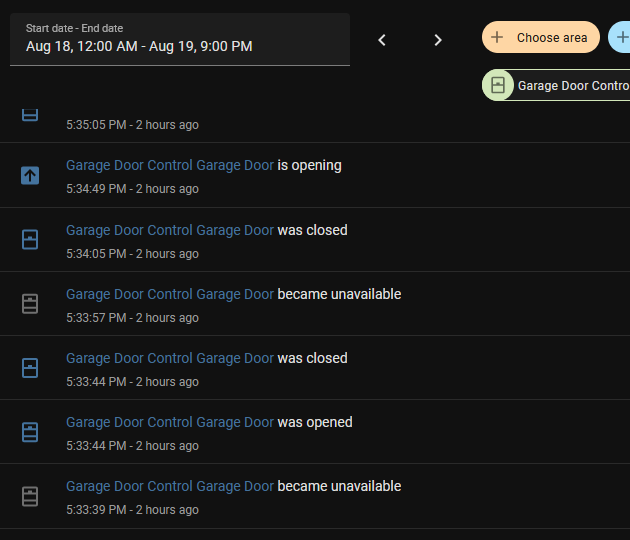
Yes I think you’re on to something there. Most of the issues I face are after a bit of time of it not being operated.
@Ryan_P I just had it in a state where I pressed open and it said opening but nothing happened. I checked ESPHome logs but couldn’t see anything. What would be the best way for us to help diagnose what’s happening when it isn’t working correctly?
Unfortunately I have not been able to reproduce this so far. I have had my devices running for over a week now, sporadically testing functionality, 3, 12, 48 hours and no problems.
As I stated above, I believe this is a network issue, either with home assistant or esphome. The best way to verify is to try for a at least a week rebooting your router daily. I’m quite certain this is an issue with espressifs WiFi driver.
I think I have found a way to reproduce this finally. With the door open, try to close the door and while the alarm is active click stop constantly until it stops. At this point there is no way to control the door as the state is in limbo. The workaround though is to turn the light on and off which restores the state correctly. Please test if switching the light on and off also helps resolve the issues you folks are experiencing.
@Ben_Anderson Any update from your side?
I have experienced the situation once now, rectified by switching the light on, which causes a status update that contains the door state so it fixes the home assistant UI.
I am looking into a workaround on this, seems more of an esphome issue where it assumes the recipient of the command is going to get the message, in this case not, so it hangs in the wrong state.
Hey, sorry for my tardiness on this. I’m currently overseas for a relative’s wedding and family holiday. I’ll be back mid-next week and can take a look shortly thereafter. I’m glad you were able to reproduce the error.
No worries mate! I have come up with some code changes that I hope will resolve this, my testing has been successful so far and I opened a PR for the changes 
1 Like
@Ben_Anderson @Bret_Slide @Robert_Rychter A release has been published that should hopefully address and resolve these problems. The GDO blaQ project version 1.5.2 contains this latest update.
Here are detailed release notes and a link to the code changes: Release 2025.9.1 · konnected-io/konnected-esphome · GitHub
Thank you again @Ben_Anderson for sending over the Merlin motor and huge thanks to @Ryan_P for tirelessly troubleshooting and replicating the issue!
Please install the firmware update and let us know if this solves it for you!
I was able to replicate the issue by spamming the stop button after clicking close. After installing the latest firmware version the state now reports correctly. I’ll report back if I ever face issues again. Thanks so much for fixing this for us all!
Worth mentiong though is if the garage door is open and I try to close it to any value other than 0%/closed it doesn’t do anything. Partial opens of the door work fine but not partial closes. When trying a partial close it makes the pre-close warning but then doesn’t do anything further. Additionally the open and close buttons grey out. Toggling the lamp fixes the state issue. This is with the new firmware version, but I had similar behavior on all previous versions that I’ve tested.
On a slight different topic, but related to the AUS version, the Merlin MS105MYQ has the yellow external accessory power terminals which outputs 30 Volts 50 mA. The GDO blaQ can receive up to 24 Volts. Perhaps if there’s ever a new hardware version it could be made to support up to 30 Volts?
This is true team work by customer and supplier. Thanks @Ben_Anderson for going the extra mile.
Regarding your testing. Is that something you believe Konnected should fix?
Now I just need to find some time to update and get back online.
@Ben_Anderson - I may need to reach out to you for some tips on installing.
The issue with partial closes is likely due to it using toggle as a workaround as it’s supposed to have sensors attached to do normal closing. Ideally I’d get some sensors attached and then it’d be all good. If Konnected or Ratgdo developers found a way to get it working though that’d be cool.
Yeah I’m happy to give some pointers if you like.
@Ben_Anderson The best way to solve this issue is to install the compatible safety beam sensors. The Toggle Only option is a workaround, but to enjoy the full capabilities of the device, and to be in compliance with local regulations, it really should have the safety beams. Some links are provided at the bottom of this article:
For the AUX power question – you could try using a DC-DC buck converter to step down the 30VDC to 12VDC. Something like this might work. However, 50mA output sounds really low and it may not provide enough power to the GDO blaQ so not guaranteed to work.
1 Like
Hi all
Is there specific wiring for Aus based Merlin motors with not photo eyes or limit switches?
If the Merlin opener has a green terminal 0, then connect the RED wire from the GDO blaQ to that terminal.