I absolutely DETEST the clicky 827LM LED light that came with my 8500w and would like to have the blaQ drive a relay to turn on a different light instead. The electrical connection seems to be easy enough (from above use Input 1 GPIO5 as output) but I’m not sure where in the esphome yaml the definition would go. I imagine we’d have a configurable 30 second timer when it opens - just not sure in relation to the packages where it would be integrated.
Hey @David_Stewart, yes adding a relay for an external light should be pretty simple. The YAML doesn’t have to go anywhere specific. The best practice is to adopt the configuration into ESPHome builder and this will auto-generate a config file that references our master config file on GitHub.
Then, you just add additional features at the bottom of the file. You can also use the !extend keyword to modify/extend the exiting component. In your use case, to add an external on/off light, it should be as simple as dropping something like this anywhere in the config file:
This would add an additional light entity in Home Assistant to control your external light. It wouldn’t override the internal light control of the GDO blaQ.
@David_Stewart I moved this to a separate thread to not totally hijack the original topic.
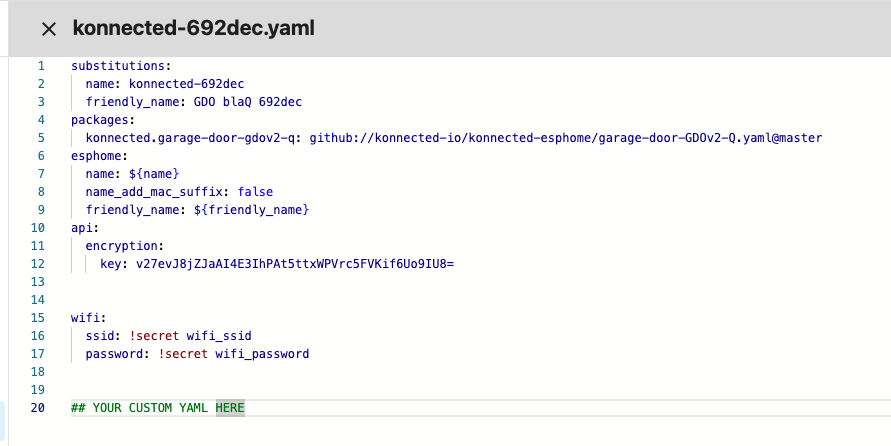
Regarding where to put the code – the best practice is to adopt the device in ESPHome Builder, then just stick your customizations at the bottom of that adopted config, like this:
If you’re compiling the firmware directly from our garage-door-GDOv2-Q.yaml file directly, that’s totally acceptable, and yes you can add it as another package if you’re doing it that way.
I think what you’ve got will work, but I think there’s a simpler way, without creating a new sensor, by just extending the current gdo_motor binary sensor with an on_state trigger, and making the light entity turn off by itself via an on_turn_on trigger. Off-the-cuff example: