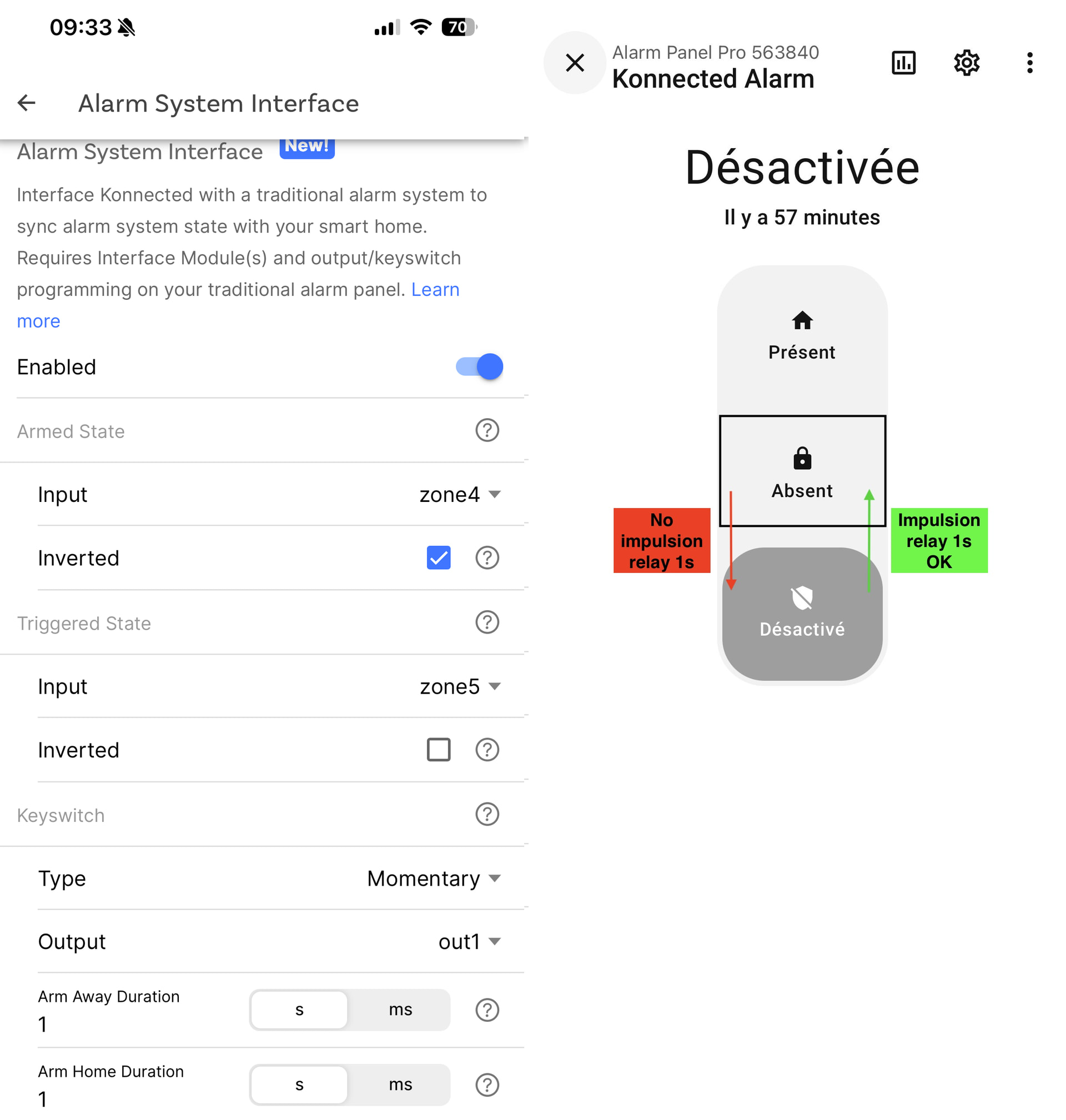
I am installing your Alarm Pro 12-zone interface kit with my traditional Talco ACB31 alarm, and I want to keep my keypad.
I have configured it correctly in the Konnected app, as shown in the attached screenshot.
The relay works fine when I slide from ‘Deactivated’ to ‘Away’. However, I cannot get the relay to work when I slide from ‘Away’ to ‘Deactivated’.
How can I configure this?
I don’t need to have the “ARM Home Duration” mode.
Exactly the same problem here, on a different alarm system (Aritech CD95). I am using Konnected ESPHome firmware version 2026.2.2 and Android App 1.6.8. I also noticed that Output type only allows Momentary to be chosen. Maybe there is a different setting that for some reason is not accessible? I am very interested in a solution or any pointers!
And second question: My old alarm system is not able to distinguish Arm Away and Arm Home on the same zone input even with different duration. So my question is: how could I use a second output (Out 2) wired to the relay of the second interface module to activate a different zone on my old panel for activating Arm Home?
After some more testing, I might have found the solution or answer @Stefou:
When you slide from ‘Deactivated’ to ‘Away‘, the panel will not really be in Armed mode until the arming delay of your traditional alarm is completed (in my case 30s) and Armed zone (zone4) becomes activated (or deactivated since you inverted it).
If you try to disarm during that time, the panel will not send a new impulsion.
If you wait until the delay is expired and the traditional alarm is fully armed (Armed zone - zone4 - become activated), then slide from ‘Away’ to ‘Deactivated’, then a new impulsion will be sent.
It did the trick for me, maybe try this as well?
Or remove the ‘Inverted’ from your Armed State input (zone4), that could be a reason why the armed state is never recognized, the Konnected panel would never send another impusion to disarm?
This said, I believe there is a bug in the logic of the Konnected panel here:
It should change to ‘Arming‘ or ‘Pending‘ state between the time the Arming impulsion is sent and the Armed State input (zone4) becomes activated, because during that time the traditonal alarm is not fully armed yet.
It should allow disarming even if Armed State input (zone4) is not activated, in case user changes his mind and want to deactivate before the traditional alarm is fully armed.
And my other question remains: How to setup a second output for Arming away?
Thank you for taking the time to respond to my post. @Marc
I understand your reasoning, but I don’t think I can get the “absent” status after 90 seconds. My zone 4 is in “standby” mode on my traditional alarm, so when I activate it, the status changes immediately (LED active), even though I know I have 90 seconds before it actually activates. I don’t even have an LED to indicate this.
So, in theory, I should be able to send another pulse to deactivate it
For your question about your second output, you can configure it in “zone settings,” but this will create a new button in your application, which I don’t think you’re interested in.
After performing further tests,
I did not activate zone 4 after activation, and there is indeed an impulse from “away” to “deactivate.” and my relay is not yet connected to my alarm.
Thank you for your help.