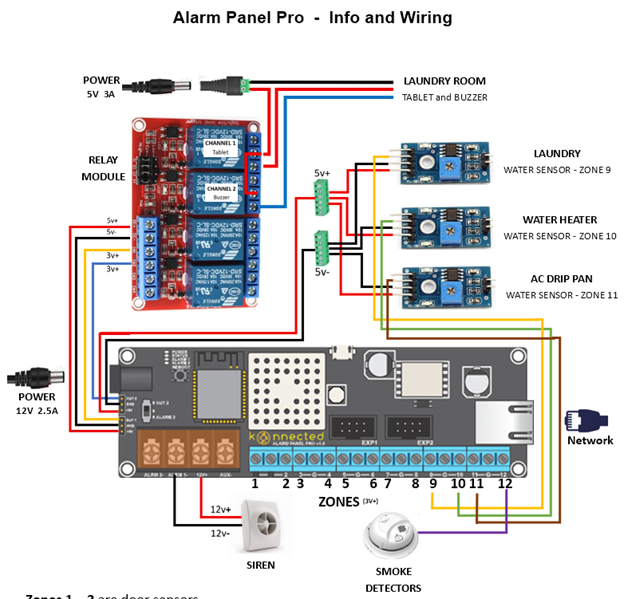
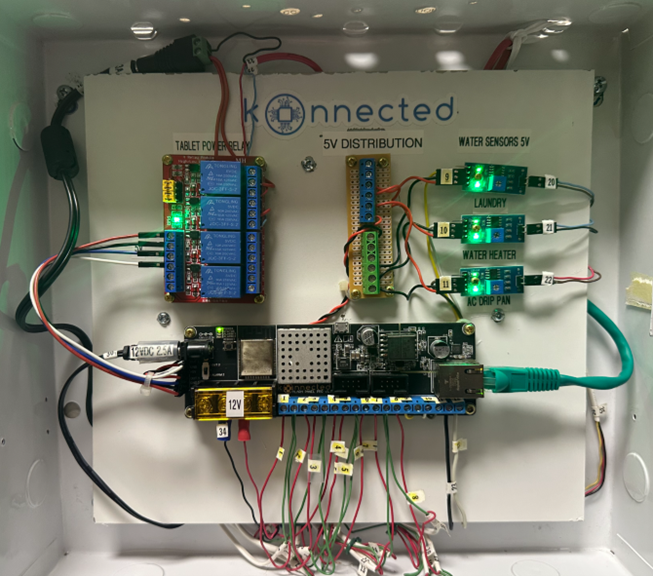
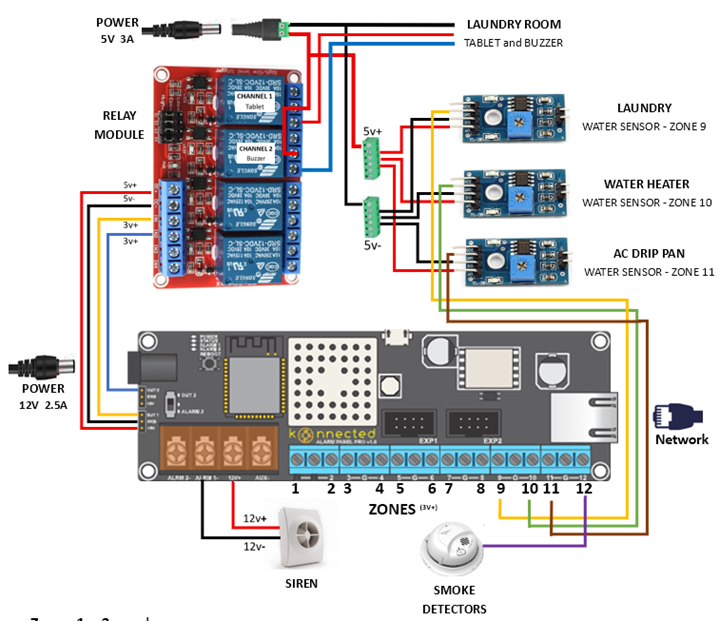
I have a Alarm System Pro (v1.7). The board’s two 5V connections power a 4-channel relay board, and 3 water sensor boards. See the attach wiring diagram.
If I use OUT 1 to switch on Relay 1, it comes on and works fine.
If I use OUT 2 to switch on Relay 2, it comes on and works fine.
If I switch on both OUT 1 & OUT 2, both relays come on… and then after about 2 seconds, the 2 relays and 3 sensor boards all “blink” off and on about once per second continuously.
If I turn off either OUT 1 or OUT 2, the blinking stops and everything is fine again.
To trouble shoot this problem, I first moved the OUT 1 & 2 connections to relays 3 and 4 (which are not connected to anything) to test the relays, but that didn’t change anything. Then I disconnected the 3 water sensor boards and everything works! Further testing shows that I can connect 2 water sensor boards running along with 2 relays. Adding the 3rd water sensor board back in reproduces the problem.
So, it seems to me that I am overloading the 5V power output circuit on the Alarm System Pro boards and it resets itself (due to heat or something??), then continues until I reduce the load (by turning off one relay).
My questions about this issue:
Does this seem like an overloaded (not enough current) 5V power output issue on the Pro board?
Is this a problem with the Pro board, or just the way it works?
I’m powering the board with a 12V 2.5 amp power adapter. Would getting a power adapter with more current (12V 4 amps) resolve this problem?
My issue was resolved by using a separate 5V power adapter for the water sensor boards (leaving the Pro board to only power the two 5V relays). If a second power adapter was not available, could I use a 12V to 5V power converter connected to AUX to power the 3 sensor boards, or would this just shift the problem to the 12V rail on the Pro board.
Thank you for any insights into my little issue! Although I have resolved the problem, I’m just trying to understand the hardware and its limitations.
Haven’t received any replies yet to answer my questions, but I did change the wiring to reduce the 5v current draw from the Alarm Pro board, and everything is working fine.
Now I just need to get it all working on HA with a Fire tablet, but that is another topic. I must say that editing and changing the alarm’s firmware with the Konnected app is simple and easy to do (as long as you remember to change the board type each time). Well done!
Hi Jim … I do not have a solution for your problem but it may shed some light on an intermittent issue that I have been having. I will need to do some troubleshooting. My question for you is … what software did you use to produce your schematics? I always like to document my circuits and have not yet found software that reproduces the Konnected boards and equipment like you have done. Thank you in advance!
While there are many different software packages to draw diagrams such as mine, I didn’t want to take the time to learn one for just this project. So, I’m kind of embarrassed to say that its just a MS Word document. The pictures of the various components I got off the internet from websites that pictured them (Konnected, Amazon, others…) that I then used MS Paint (gasp!) to trim the image, then insert into the document and resize them as needed. Then I added text, text boxes, and shapes (the lines). So nothing magical, and it took me way too much time to create, but I’m happy with the results.
If you want the Word document to play around with, I’ll be happy to email it to you.
The circuit diagram looks amazing and serves the intended purpose! Great job! I would love to get a copy of the word document if it can be posted here. Thank you!
So since you asked, here is (for better or worse) my full documentation on the Konnected Alarm. It includes the wiring diagram and a lot of other stuff. My intend was to document most everything in case I forgot something or maybe we sell the house.
The wiring diagram is a little “fragile” in that its a collection of text, text boxes, and images all pasted on top of each other. So somethings if you take out a line of text, things will move. And some of the text is actually image clips so I could move them around to be exactly where I wanted them. Bottom line is, be careful and good luck!
(ok, just tried to upload the Word doc, but it only allows image types. If you want this as a Word doc, just send me an email at Jim@SmithHome.us and I’ll send it to you.)